

Commons Demo: the free toolkit behind our add-on demos

A good demo does two things at once: it shows the component running, and it shows the code that makes it run. Developers evaluating an add-on want to see the result, then copy the snippet that produced it.
Doing that by hand is tedious. You end up pasting code into the page, and the moment the example changes, the pasted code is out of date. Multiply that by dozens of add-ons and several Vaadin versions, and keeping demos consistent becomes a job of its own.
That is why we built our demos with the help of Commons Demo, a small open-source library that does this work for you. In this post we introduce it, show where you can see it in action, and explain how to use it in your own projects.
What Commons Demo is
Commons Demo is a Java library of UI classes for building Vaadin Flow demos. It is licensed under Apache 2.0 and published on Maven Central. Version 5.x supports Vaadin 24 and 25, and version 3.x supports Vaadin 14 to 23.
What it does for your demos
Commons Demo handles everything around your examples: the layout, the source code and the themes. You write the example, and the demo builds itself around it.
A demo that feels like a product
Visitors land on a polished page, not a test harness.
- One tab per example. Every example gets its own tab, named after its page title, and its own URL, so you can link straight to the feature you want to show. When the examples outgrow the tab bar, the extra ones move into a menu, and a demo with a single example can hide the tabs altogether.
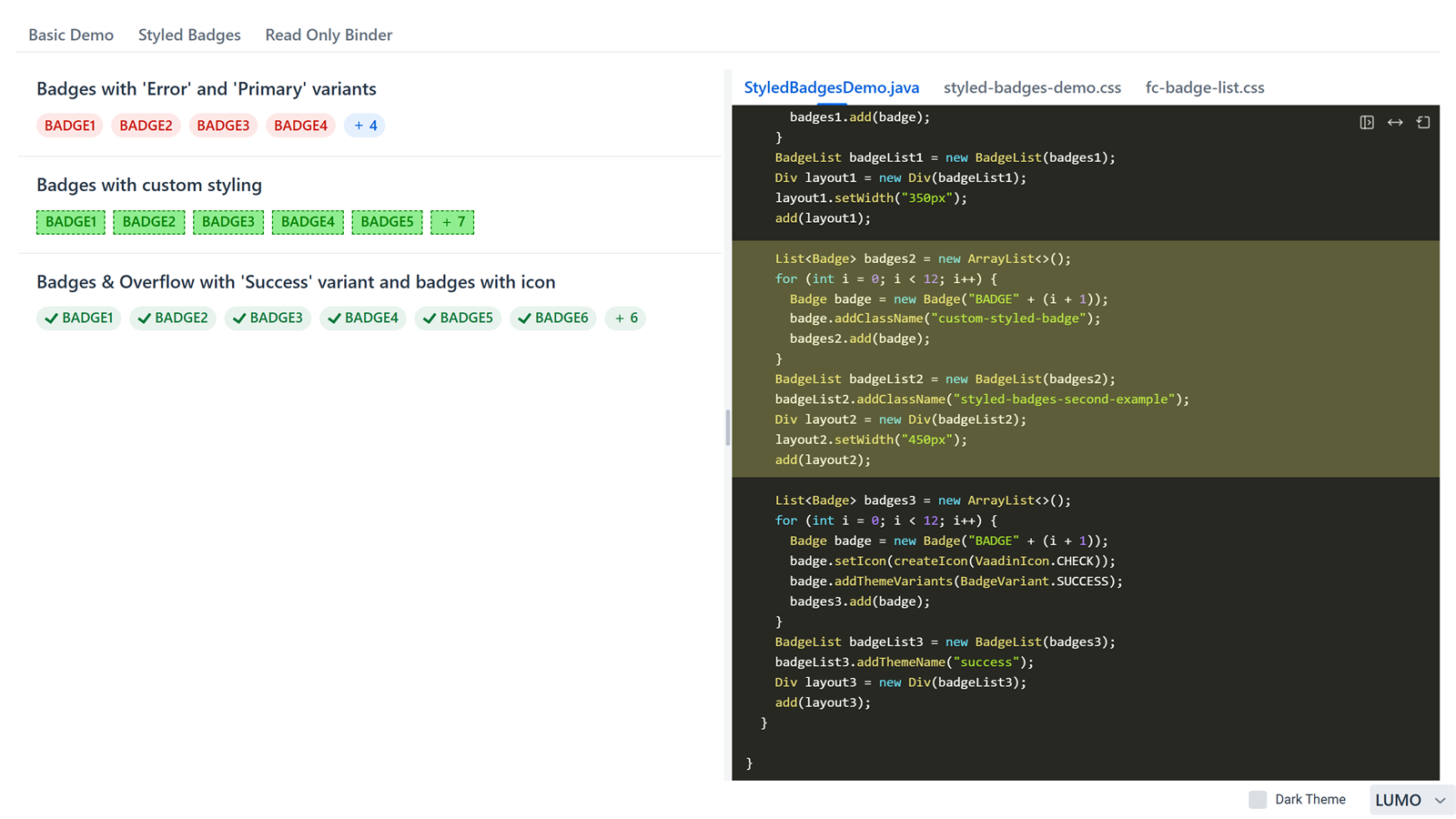
- See it and read it at the same time. The running example sits next to its source. One click hides the code, moves it to the other side, or switches between a side-by-side and a stacked layout. Your choice sticks as you move from one example to the next.
- Works on any screen. In portrait the layout stacks vertically, and on phones the code starts hidden so the component gets the space.
- Light, dark, Lumo or Aura. Visitors can switch to dark mode and, on Vaadin 25, between Lumo, Aura and the base styles, without reloading. It is the quickest way to check that a component looks right everywhere.
- Always the right version. The footer shows the add-on name and version, read from the jar, so visitors know exactly which release they are trying.
- Fits into your app. If you want your own controls, the layout exposes an API for them. Our showcase app uses it to move the theme switcher to its header.
Code you can trust
The code on screen is the code that runs.
- Always in sync. Commons Demo reads the code from the example’s own source file in your GitHub repository, so visitors always see the real file, never a pasted copy that goes stale.
- Live while you develop. When you run the demo locally, it reads your local files instead, so you see your changes before you push them.
- Sources from anywhere. If your sources live somewhere else, you can plug in your own resolver. Our showcase app uses one to serve each add-on’s code straight from the add-on’s jar.
Code that reads like an example
Real demo classes carry noise: package lines, license headers, routing annotations, helper calls. Visitors only need the part worth copying.
- Clean by default. The viewer strips that noise out and shortens the license to two lines.
- You decide what shows. Add
// hide-sourceto a line readers don’t need, such as a workaround or test setup, and it disappears from the viewer. Write// show-sourcefollowed by code, and the viewer shows that code even though it is never compiled, which helps when the real call has to go through reflection. Wrap lines in// #if vaadin ge 24…// #else…// #endif, and visitors only see the branch for the Vaadin version the demo runs on. - Highlight what matters. Mark the part of the code behind a feature worth pointing out. Hovering over or clicking the component highlights the matching lines and scrolls them into view, even when they live in another file, such as the CSS that styles it.
- Every file it needs. An example can show as many files as it needs, Java, CSS or JavaScript, each in its own tab with syntax highlighting.
New in 5.5: the source travels with the demo
Source inside the jar. Commons Demo 5.5 adds commons-demo-processor, an annotation processor that copies the source files of your examples into the jar at build time. Combined with a resolver that reads them from the jar, like the one in our showcase app, the demo shows the exact code of the version it was built from instead of whatever is on the GitHub branch. This is now the recommended way to use Commons Demo, and our add-ons already use it when they build their demo jars.
Where you can see it
Commons Demo powers two public demo sites:
- Flowing Code Add-ons. Our showcase app, built with Commons Demo, brings together the demos of more than 35 open-source add-ons, from Grid Exporter and Google Maps to Image Crop and XTerm. Every demo page uses the same layout, so moving from one add-on to the next feels familiar.
- Vaadin Component Factory Add-ons. We also maintain the demo site for the Vaadin Component Factory add-ons. It currently shows more than 20 of them, including Enhanced Grid, Autocomplete, PDF Viewer and Timeline, with the same tabbed layout and source viewer.
In both sites, each add-on has its own tabbed page. You can try every example, read the exact code behind it and switch the theme to see how the component looks in light or dark mode.
How to use it
Getting started takes a dependency and two small classes.
Add the dependency (in an add-on project, with test scope):
<dependency>
  <groupId>com.flowingcode.vaadin.addons.demo</groupId>
  <artifactId>commons-demo</artifactId>
  <version>5.5.0</version>
</dependency>
Create a tabbed view that points to your repository, and annotate each example with @DemoSource:
import com.flowingcode.vaadin.addons.GithubBranch;
import com.flowingcode.vaadin.addons.GithubLink;
import com.flowingcode.vaadin.addons.demo.TabbedDemo;

@Route("my-addon")
@GithubLink("https://github.com/your-org/my-addon")
@GithubBranch("master")
public class MyAddonDemoView extends TabbedDemo {

  public MyAddonDemoView() {
    addDemo(BasicDemo.class);
  }
}
import com.flowingcode.vaadin.addons.demo.DemoSource;
import com.flowingcode.vaadin.addons.demo.SourceCodeViewer;
import com.vaadin.flow.component.button.Button;
import com.vaadin.flow.component.notification.Notification;
import com.vaadin.flow.component.orderedlayout.VerticalLayout;
import com.vaadin.flow.router.PageTitle;
import com.vaadin.flow.router.Route;
@DemoSource
@PageTitle("Basic")
@Route(value = "my-addon/basic", layout = MyAddonDemoView.class)
public class BasicDemo extends VerticalLayout {
public BasicDemo() {
// begin-block button
Button button = new Button("Say hello", e -> Notification.show("Hello!"));
button.setId("hello-button"); // hide-source
SourceCodeViewer.highlightOnHover(button, "button");
add(button);
// end-block
}
}The viewer hides the setId line and the highlightOnHover call, so visitors only see the button.
Run the app, open /my-addon, and the example appears next to its source. The README covers everything else.
Free for your projects too
Commons Demo is not only for Flowing Code add-ons. It is free and open source under the Apache 2.0 license, so anyone can use it. If you build Vaadin add-ons, or want to showcase the components of your own application, it gives you a polished demo with live source code without writing any of that plumbing yourself.
Give it a try and tell us what you think. Is there a feature you miss, or something that would make your demos easier to build? Open an issue on GitHub and let us know. Bug reports and pull requests are welcome too. We would love to see what you build with it.

Paola De Bartolo
Systems Engineer. Java Developer. Vaadin enthusiast since the moment I heard "you can implement all UI with Java". Proud member of the #FlowingCodeTeam since 2017.
Join the conversation!