

Vaadin TreeGrid with lazy loading, filtering and sorting

I’m giving my first steps into Vaadin 14 after a long, long time of Vaadin 8 projects and I want to share my experience when it was time to work with the TreeGrid component to display hierarchical data. I ran into this issue where I needed to add filtering and sorting to a Vaadin TreeGrid implementing lazy loading. I had this article for Grid as base but some things are different so I thought it would be a good idea to share all the steps needed and all things to keep in mind for this kind of implementation.
For the following explanation I will assume that you have some knowledge on Vaadin components and lazy loading.
To start, let’s define an entity class to represent the data we want to display hierarchically. In this case, Department entity:
public class Department {

    private int id;
    private String name;
    private String manager;
    private Department parent;

    public Department(int id, String name, Department parent, String manager) {
        this.id = id;
        this.name = name;
        this.manager = manager;
        this.parent = parent;
    }

    public int getId() {
        return id;
    }

    public void setId(int id) {
        this.id = id;
    }

    public String getName() {
        return name;
    }

    public void setName(String name) {
        this.name = name;
    }

    public String getManager() {
        return manager;
    }

    public void setManager(String manager) {
        this.manager = manager;
    }

    public Department getParent() {
        return parent;
    }

    public void setParent(Department parent) {
        this.parent = parent;
    }

}
After that, we can define the TreeGrid and it’s data provider with lazy loading. Unlike Grid, the fetch and count callbacks are based on HierarchicalQuery. So now, to implement hierarchical lazy data provider we need to define the following three methods:
protected Stream<Department> fetchChildrenFromBackEnd(HierarchicalQuery<Department, String> query) {...}

public int getChildCount(HierarchicalQuery<Department, String> query) {...}

public boolean hasChildren(Department item) {...}
As a result, the TreeGrid with lazy loading implementation will will look like this:
public MainView() {

    TreeGrid<Department> treeGrid = new TreeGrid<>();
    treeGrid.addHierarchyColumn(Department::getName)
    .setHeader("Department Name").setKey("name");
    treeGrid.addColumn(Department::getManager)
    .setHeader("Manager").setKey("manager");

    DepartmentService departmentService = new DepartmentService();

    HierarchicalDataProvider<Department, Void> dataProvider =
	new AbstractBackEndHierarchicalDataProvider<Department, Void>() {

	// returns the number of immediate child items
	@Override
	public int getChildCount(HierarchicalQuery<Department, Void> query) {
	    return (int) departmentService.getChildCount(query.getParent());
	}

	// checks if a given item should be expandable
	@Override
	public boolean hasChildren(Department item) {
	    return departmentService.hasChildren(item);
	}

	// returns the immediate child items based on offset and limit
	@Override
	protected Stream<Department> fetchChildrenFromBackEnd(
		HierarchicalQuery<Department, Void> query) {
		return departmentService.fetchChildren(query.getParent(),
                  query.getLimit(), query.getOffset()).stream();
	}
    };

    treeGrid.setDataProvider(dataProvider);
    add(treeGrid);
}
Of course, we have to define a service class that will be in charge of retrieving the data from the backend. This service will have to implement the following methods in order to be able to set the data provider of the Tree Grid:
public List<Department> fetchChildren(Department parent) {...}

public int getChildCount(Department parent) {...}

public boolean hasChildren(Department parent, int limit, int offset) {...}
But, what if we want to add filtering and sorting to this implementation? Let’s see…
Filtering
Define a filter class that can be applied to the collection of items, to filter them out:
public class DepartmentFilter {

	private String nameFilter = null;
	private String managerFilter = null;

	public DepartmentFilter() {	}

	public DepartmentFilter(String nameFilter, String managerFilter) {
		this.nameFilter = nameFilter;
		this.managerFilter = managerFilter;
	}

	public String getNameFilter() {
		return nameFilter;
	}

	public void setNameFilter(String nameFilter) {
		this.nameFilter = nameFilter;
	}

	public String getManagerFilter() {
		return managerFilter;
	}

	public void setManagerFilter(String managerFilter) {
		this.managerFilter = managerFilter;
	}

}
Instead of using a HierarchicalDataProvider, we need to configure a HierarchicalConfigurableFilterDataProvider that will allow us to set a filter to apply to the queries. We need to wrap the data provider into a ConfigurableDataProvider by calling withConfigurableFilter() method in order to tell the data provider that is going to be filterable.
HierarchicalConfigurableFilterDataProvider<Department, Void, DepartmentFilter> dataProvider =
     new AbstractBackEndHierarchicalDataProvider<Department, DepartmentFilter>() {

   // returns the number of immediate child items based on query filter
   @Override
   public int getChildCount(HierarchicalQuery<Department, DepartmentFilter> query) {
      return (int) departmentService.getChildCount(query.getParent(), query.getFilter().orElse(null));
   }

   // checks if a given item should be expandable
   @Override
   public boolean hasChildren(Department item) {
      return departmentService.hasChildren(item);
   }

   // returns the immediate child items based on offset, limit and filter
   @Override
   protected Stream<Department> fetchChildrenFromBackEnd(
	    HierarchicalQuery<Department, DepartmentFilter> query) {
      return departmentService.fetchChildren(query.getParent(),
            query.getLimit(), query.getOffset(),
            query.getFilter().orElse(null)).stream();
   }

}.withConfigurableFilter();

// set data provider to tree
treeGrid.setDataProvider(dataProvider);

// define filter
DepartmentFilter treeFilter = new DepartmentFilter();

// set filter to data provider
dataProvider.setFilter(treeFilter);
Update the UI adding new filter fields for the columns we want to be filterable. Add this fields to a header row. That will display the filter fields on top of each column:
HeaderRow filterRow = treeGrid.prependHeaderRow();

TextField nameFilterTF = new TextField();
nameFilterTF.setClearButtonVisible(true);
nameFilterTF.addValueChangeListener(e -> {
	treeFilter.setNameFilter(e.getValue());
	dataProvider.refreshAll();
});
filterRow.getCell(treeGrid.getColumnByKey("name")).setComponent(nameFilterTF);

TextField managerFilterTF = new TextField();
managerFilterTF.setClearButtonVisible(true);
managerFilterTF.addValueChangeListener(e -> {
	treeFilter.setManagerFilter(e.getValue());
	dataProvider.refreshAll();
});
filterRow.getCell(treeGrid.getColumnByKey("manager")).setComponent(managerFilterTF);
Finally, don’t forget to update the service class to fetch data using DepartmentFilter in case of filtering. The methods to update in the current example are:
public List<Department> fetchChildren(Department parent, int limit, int offset, DepartmentFilter filter) {...}

public int getChildCount(Department parent, DepartmentFilter filter) {...}
Sorting
Similarly to filtering, we need to define a class to store the sorting information:
public class DepartmentSort {

        public static final String NAME = "name";
        public static final String MANAGER = "manager";

        private String propertyName;
        private boolean descending;

	public DepartmentSort(String propertyName, boolean descending) {
		this.propertyName = propertyName;
		this.descending = descending;
	}
	public String getPropertyName() {
		return propertyName;
	}
	public void setPropertyName(String propertyName) {
		this.propertyName = propertyName;
	}
	public boolean isDescending() {
		return descending;
	}
	public void setDescending(boolean descending) {
		this.descending = descending;
	}

}
Then, update the definition of the data provider to send the sorting properties and order to the backend where sorting happens:
HierarchicalConfigurableFilterDataProvider<Department, Void, DepartmentFilter> dataProvider =
	new AbstractBackEndHierarchicalDataProvider<Department, DepartmentFilter>() {

	// returns the number of immediate child items based on query filter
	@Override
	public int getChildCount(HierarchicalQuery<Department, DepartmentFilter> query) {
		return (int) departmentService.getChildCount(query.getParent(),
                  query.getFilter().orElse(null));
	}

	// checks if a given item should be expandable
	@Override
	public boolean hasChildren(Department item) {
		return departmentService.hasChildren(item);
	}

	// returns the immediate child items based on offset, limit, filter and sorting
	@Override
	protected Stream<Department> fetchChildrenFromBackEnd(
		HierarchicalQuery<Department, DepartmentFilter> query) {
		List<DepartmentSort> sortOrders = query.getSortOrders().stream()
			.map(sortOrder -> new DepartmentSort(sortOrder.getSorted(),
                         sortOrder.getDirection().equals(SortDirection.ASCENDING)))
			.collect(Collectors.toList());
		return departmentService.fetchChildren(query.getParent(), query.getLimit(),
                   query.getOffset(), query.getFilter().orElse(null), sortOrders).stream();
	}

}.withConfigurableFilter();
As a final step, one more time, we need to update the service class to get data sorted by the properties and order selected. In this part, we only need to update fetchChildren method:
public Collection<Department> fetchChildren(Department parent, int limit,
         int offset, DepartmentFilter filter, List<DepartmentSort> sortOrders) { ... }
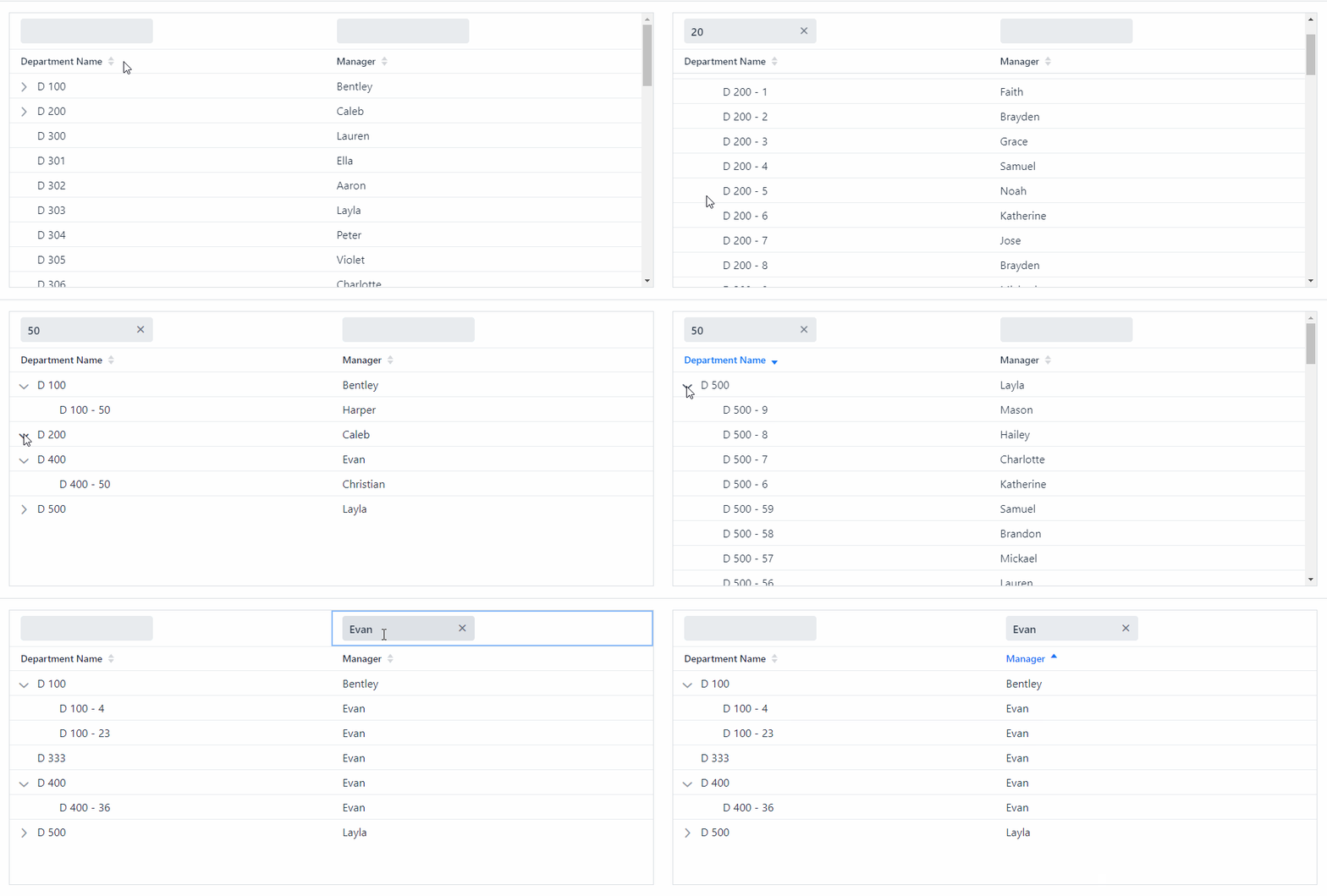
And like that, we have a TreeGrid with lazy loading, filtering and sorting.
Check out the following animation to see some TreeGrid action:
In addition, a few things to keep in mind:
#1: Don’t forget to specify which columns are sortable by using setSortable(true) or setSortProperty(…)
treeGrid.addHierarchyColumn(Department::getName)
    .setHeader("Department Name").setKey("name")
    .setSortProperty(DepartmentSort.NAME);
treeGrid.addColumn(Department::getManager)
    .setHeader("Manager").setKey("manager")
    .setSortProperty(DepartmentSort.MANAGER);
If the column is sortable and a sort property is not specified, the column key will be used by default.
#2: You can use setMultisort(true) to enable multiple column sorting on the client-side
treeGrid.setMultiSort(true);#3: When adding the fields for filtering in the header row, don’t forget to call refreshAll() method, so the data provider will trigger the loading of the data based on the new specified filter values.
TextField managerFilterTF = new TextField();
	managerFilterTF.setClearButtonVisible(true);
	managerFilterTF.addValueChangeListener(e -> {
		treeFilter.setManagerFilter(e.getValue());
		dataProvider.refreshAll();    // -> don't forget about this!
	});
You can find the complete example in our GitHub organization. Click here if you want to checkout the source code and test the implementation yourself.
Hope you find this useful and feel free to write if any concern arise.
Thanks for reading and keep the code flowing!

Paola De Bartolo
Systems Engineer. Java Developer. Vaadin enthusiast since the moment I heard "you can implement all UI with Java". Proud member of the #FlowingCodeTeam since 2017.
Join the conversation!